
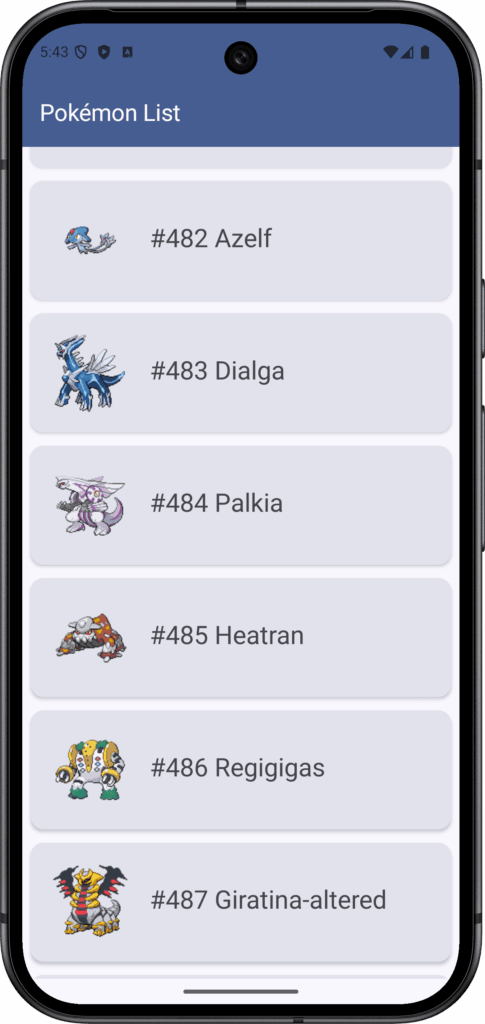
追加読み込み処理をざっくりと学べる構成になっています。
実行環境:
- Android Studio Ladybug | 2024.2.1 Patch 1
- macOS,Tahoe (26.1) ※Apple Silicon
- JDK,17 (Microsoft OpenJDK)
- Gradle,8.9
- Kotlin,2.0.0
Contents 非表示
MyPokemonPaging (名前は適当でok)/
├── app/
│   └── src/main/java/com/example/pokemonpaging/
│       ├── PokemonApp.kt                // @HiltAndroidApp
│       ├── MainActivity.kt              // @AndroidEntryPoint
│       │
│       ├── di/
│       │   └── NetworkModule.kt         // Retrofit, OkHttp, Api定義の注入
│       │
│       ├── data/
│       │   ├── remote/
│       │   │   ├── PokeApi.kt           // GET pokemon?offset={os}&limit=10
│       │   │   └── PokemonResponse.kt   // APIレスポンスDTO
│       │   │
│       │   ├── paging/
│       │   │   └── PokemonPagingSource.kt // 【重要】Paging 3の核。リクエストロジック
│       │   │
│       │   └── repository/
│       │       └── PokemonRepositoryImpl.kt
│       │
│       ├── domain/
│       │   ├── model/
│       │   │   └── Pokemon.kt           // UIで使う純粋なデータクラス(名前, 画像URLなど)
│       │   └── repository/
│       │       └── PokemonRepository.kt // PagingData<Pokemon>をFlowで返す定義
│       │
│       └── presentation/
│           ├── pokemon_list/
│           │   ├── PokemonListViewModel.kt // Pagerを生成してFlowを公開
│           │   ├── PokemonListScreen.kt    // LazyColumnでリスト表示
│           │   └── components/
│           │       ├── PokemonListItem.kt  // 各ポケモンのカードUI
│ │ └── LoadingItem.kt // 追記読み込み中のぐるぐるlibs.version.toml:
[versions]
agp = "8.7.1"
kotlin = "2.0.0"
coreKtx = "1.15.0"
junit = "4.13.2"
junitVersion = "1.3.0"
espressoCore = "3.7.0"
lifecycleRuntimeKtx = "2.10.0"
activityCompose = "1.10.0"
composeBom = "2024.04.01"
# 追加 -- ここから
hilt = "2.51.1"
hiltNavigationCompose = "1.2.0"
retrofit = "2.11.0"
okhttp = "4.12.0"
serialization = "1.6.3"
composeIcons = "1.7.0"
paging = "3.3.2"
coil = "2.6.0"
lifecycleRuntimeCompose = "2.8.2"
# 追加 -- ここまで

[libraries]
androidx-core-ktx = { group = "androidx.core", name = "core-ktx", version.ref = "coreKtx" }
junit = { group = "junit", name = "junit", version.ref = "junit" }
androidx-junit = { group = "androidx.test.ext", name = "junit", version.ref = "junitVersion" }
androidx-espresso-core = { group = "androidx.test.espresso", name = "espresso-core", version.ref = "espressoCore" }
androidx-lifecycle-runtime-ktx = { group = "androidx.lifecycle", name = "lifecycle-runtime-ktx", version.ref = "lifecycleRuntimeKtx" }
androidx-activity-compose = { group = "androidx.activity", name = "activity-compose", version.ref = "activityCompose" }
androidx-compose-bom = { group = "androidx.compose", name = "compose-bom", version.ref = "composeBom" }
androidx-ui = { group = "androidx.compose.ui", name = "ui" }
androidx-ui-graphics = { group = "androidx.compose.ui", name = "ui-graphics" }
androidx-ui-tooling = { group = "androidx.compose.ui", name = "ui-tooling" }
androidx-ui-tooling-preview = { group = "androidx.compose.ui", name = "ui-tooling-preview" }
androidx-ui-test-manifest = { group = "androidx.compose.ui", name = "ui-test-manifest" }
androidx-ui-test-junit4 = { group = "androidx.compose.ui", name = "ui-test-junit4" }
androidx-material3 = { group = "androidx.compose.material3", name = "material3" }
# 追加 -- ここから
# Hilt
hilt-android = { group = "com.google.dagger", name = "hilt-android", version.ref = "hilt" }
hilt-compiler = { group = "com.google.dagger", name = "hilt-android-compiler", version.ref = "hilt" }
androidx-hilt-navigation-compose = { group = "androidx.hilt", name = "hilt-navigation-compose", version.ref = "hiltNavigationCompose" }

# Retrofit & OkHttp
retrofit = { group = "com.squareup.retrofit2", name = "retrofit", version.ref = "retrofit" }
retrofit-serialization = { group = "com.jakewharton.retrofit", name = "retrofit2-kotlinx-serialization-converter", version = "1.0.0" }
okhttp-logging = { group = "com.squareup.okhttp3", name = "logging-interceptor", version.ref = "okhttp" }

# Kotlin Serialization (JSONパース用)
kotlinx-serialization-json = { group = "org.jetbrains.kotlinx", name = "kotlinx-serialization-json", version.ref = "serialization" }

# アイコン
androidx-compose-material-icons-extended = { group = "androidx.compose.material", name = "material-icons-extended", version.ref = "composeIcons" }

# Paging 3
androidx-paging-runtime = { group = "androidx.paging", name = "paging-runtime", version.ref = "paging" }
androidx-paging-compose = { group = "androidx.paging", name = "paging-compose", version.ref = "paging" }

# Coil (Image Loading)
coil-compose = { group = "io.coil-kt", name = "coil-compose", version.ref = "coil" }

# Lifecycle (collectAsStateWithLifecycle用)
androidx-lifecycle-runtime-compose = { group = "androidx.lifecycle", name = "lifecycle-runtime-compose", version.ref = "lifecycleRuntimeKtx" }
# 追加 -- ここまで

[plugins]
android-application = { id = "com.android.application", version.ref = "agp" }
kotlin-android = { id = "org.jetbrains.kotlin.android", version.ref = "kotlin" }
kotlin-compose = { id = "org.jetbrains.kotlin.plugin.compose", version.ref = "kotlin" }
# 追加 -- ここから
hilt = { id = "com.google.dagger.hilt.android", version.ref = "hilt" }
kotlin-serialization = { id = "org.jetbrains.kotlin.plugin.serialization", version.ref = "kotlin" }
# 追加 -- ここまで
build.gradle.kts (モジュール):
plugins {
    alias(libs.plugins.android.application)
    alias(libs.plugins.kotlin.android)
    alias(libs.plugins.kotlin.compose)
    // 追加 -- ここから
    alias(libs.plugins.hilt)
    alias(libs.plugins.kotlin.serialization)
    id("kotlin-kapt") // Hiltに必要
    // 追加 -- ここまで
}

android {
    namespace = "com.example.mypokemonpaging"
    compileSdk = 36

    defaultConfig {
        applicationId = "com.example.mypokemonpaging"
        minSdk = 24
        targetSdk = 36
        versionCode = 1
        versionName = "1.0"

        testInstrumentationRunner = "androidx.test.runner.AndroidJUnitRunner"
    }

    buildTypes {
        release {
            isMinifyEnabled = false
            proguardFiles(
                getDefaultProguardFile("proguard-android-optimize.txt"),
                "proguard-rules.pro"
            )
        }
    }
    compileOptions {
        sourceCompatibility = JavaVersion.VERSION_11
        targetCompatibility = JavaVersion.VERSION_11
    }
    kotlinOptions {
        jvmTarget = "11"
    }
    buildFeatures {
        compose = true
    }
}

dependencies {

    implementation(libs.androidx.core.ktx)
    implementation(libs.androidx.lifecycle.runtime.ktx)
    implementation(libs.androidx.activity.compose)
    implementation(platform(libs.androidx.compose.bom))
    implementation(libs.androidx.ui)
    implementation(libs.androidx.ui.graphics)
    implementation(libs.androidx.ui.tooling.preview)
    implementation(libs.androidx.material3)
    testImplementation(libs.junit)
    androidTestImplementation(libs.androidx.junit)
    androidTestImplementation(libs.androidx.espresso.core)
    androidTestImplementation(platform(libs.androidx.compose.bom))
    androidTestImplementation(libs.androidx.ui.test.junit4)
    debugImplementation(libs.androidx.ui.tooling)
    debugImplementation(libs.androidx.ui.test.manifest)

    // 追加 -- ここから
    // Hilt
    implementation(libs.hilt.android)
    kapt(libs.hilt.compiler)
    implementation(libs.androidx.hilt.navigation.compose)

    // Networking
    implementation(libs.retrofit)
    implementation(libs.retrofit.serialization)
    implementation(libs.okhttp.logging)
    implementation(libs.kotlinx.serialization.json)
    implementation(libs.androidx.compose.material.icons.extended)

    // Paging 3
    implementation(libs.androidx.paging.runtime)
    implementation(libs.androidx.paging.compose)

    // Coil
    implementation(libs.coil.compose)

    // Lifecycle Compose (ViewModelのState監視用)
    implementation(libs.androidx.lifecycle.runtime.compose)
    // 追加 -- ここまで
}
build.gradle.kts (プロジェクト):
plugins {
    alias(libs.plugins.android.application) apply false
    alias(libs.plugins.kotlin.android) apply false
    alias(libs.plugins.kotlin.compose) apply false
    // 追加 -- ここから
    alias(libs.plugins.hilt) apply false
    alias(libs.plugins.kotlin.serialization) apply false
    // 追加 -- ここまで
}
AndroidManifest.xml:
<?xml version="1.0" encoding="utf-8"?>
<manifest xmlns:android="http://schemas.android.com/apk/res/android"
    xmlns:tools="http://schemas.android.com/tools"> // 追加

    <uses-permission android:name="android.permission.INTERNET" />

    <application
        android:name=".PokemonApp" // 書き換え
PokemonApp:
@HiltAndroidApp
class PokemonApp : Application()
MainActivity:
@AndroidEntryPoint // 入口宣言
class MainActivity : ComponentActivity() {
    override fun onCreate(savedInstanceState: Bundle?) {
        super.onCreate(savedInstanceState)
        enableEdgeToEdge()
        setContent {
            MyPokemonPagingTheme {
                PokemonListScreen()
            }
        }
    }
}PokemonPagingSource:
class PokemonPagingSource(
    private val api: PokeApi,
    private val initialOffset: Int // 初回ランダムoffset用
) : PagingSource<Int, PokemonDto>() {

    override fun getRefreshKey(state: PagingState<Int, PokemonDto>): Int? {
        return state.anchorPosition?.let { anchorPosition ->
            state.closestPageToPosition(anchorPosition)?.prevKey?.plus(state.config.pageSize)
                ?: state.closestPageToPosition(anchorPosition)?.nextKey?.minus(state.config.pageSize)
        }
    }

    override suspend fun load(params: LoadParams<Int>): LoadResult<Int, PokemonDto> {
        return try {
            val offset = params.key ?: initialOffset
            val limit = params.loadSize

            val response = api.getPokemonList(offset = offset, limit = limit)

            LoadResult.Page(
                data = response.results,
                prevKey = if (offset <= 0) null else offset - limit, // 上方向読み込み
                nextKey = if (response.results.isEmpty()) null else offset + limit // 下方向読み込み
            )
        } catch (e: Exception) {
            LoadResult.Error(e)
        }
    }
}
PokemonRepository & PokemonRepositoryImpl:
interface PokemonRepository {
    /**
     * ポケモンのページングデータを取得する
     * @param initialOffset 初回の取得位置(ランダム)
     */
    fun getPokemonList(initialOffset: Int): Flow<PagingData<PokemonDto>>
}

class PokemonRepositoryImpl @Inject constructor(
    private val api: PokeApi
) : PokemonRepository {

    override fun getPokemonList(initialOffset: Int): Flow<PagingData<PokemonDto>> {
        return Pager(
            config = PagingConfig(
                pageSize = 20,         // 1ページあたりの件数
                prefetchDistance = 5,   // 残り5件で次のページを読み込み
                enablePlaceholders = false
            ),
            pagingSourceFactory = {
                PokemonPagingSource(api, initialOffset)
            }
        ).flow
    }
}
PokeApi:
interface PokeApi {
    @GET("pokemon")
    suspend fun getPokemonList(
        @Query("offset") offset: Int,
        @Query("limit") limit: Int
    ): PokemonResponse
}
Module:
@Module
@InstallIn(SingletonComponent::class)
object NetworkModule {
    @Provides
    @Singleton
    fun provideJson(): Json = Json { ignoreUnknownKeys = true }

    @Provides
    @Singleton
    fun providePokeApi(json: Json): PokeApi {
        return Retrofit.Builder()
            .baseUrl("https://pokeapi.co/api/v2/")
            .addConverterFactory(json.asConverterFactory("application/json".toMediaType()))
            .build()
            .create(PokeApi::class.java)
    }
}

@Module
@InstallIn(SingletonComponent::class)
abstract class RepositoryModule {
    @Binds
    @Singleton
    abstract fun bindPokemonRepository(
        impl: PokemonRepositoryImpl
    ): PokemonRepository
}Pokemon:
data class Pokemon(
    val id: Int,
    val name: String,
    val imageUrl: String
)

// PokemonDtoからPokemonへの変換関数
fun PokemonDto.toDomain(): Pokemon {
    val id = url.split("/").dropLast(1).last().toIntOrNull() ?: 0 // ID取得
    return Pokemon(
        id = id,
        name = name,
        imageUrl = imageUrl
    )
}
PokemonResponse:
@Serializable
data class PokemonResponse(
    @SerialName("results") val results: List<PokemonDto>
)

@Serializable
data class PokemonDto(
    @SerialName("name") val name: String,
    @SerialName("url") val url: String
) {
    // URLからIDを抜き出して画像URLを生成
    val imageUrl: String
        get() {
            val id = url.split("/").dropLast(1).last()
            return "https://raw.githubusercontent.com/PokeAPI/sprites/master/sprites/pokemon/$id.png"
        }
}
PokemonListViewModel:
@HiltViewModel
class PokemonListViewModel @Inject constructor(
    private val repository: PokemonRepository
) : ViewModel() {

    // 0から1000の間でランダムな開始位置を決める
    private val randomOffset = Random.nextInt(0, 1000)

    val pokemonList: Flow<PagingData<PokemonDto>> = repository
        .getPokemonList(randomOffset)
        .cachedIn(viewModelScope) // 読み込んだデータをキャッシュして無駄なリロードを防ぐ
}
LoadingItem:
@Composable
fun LoadingItem() {
    Box(
        modifier = Modifier
            .fillMaxWidth()
            .padding(16.dp),
        contentAlignment = Alignment.Center
    ) {
        CircularProgressIndicator(modifier = Modifier.size(32.dp))
    }
}

@Preview
@Composable
fun PreviewLoadingItem() {
    LoadingItem()
}
PokemonListItem:
@Composable
fun PokemonListItem(pokemon: Pokemon) {
    Card(
        modifier = Modifier
            .fillMaxWidth()
            .padding(horizontal = 8.dp, vertical = 4.dp),
        colors = CardDefaults.cardColors(
            containerColor = MaterialTheme.colorScheme.surfaceVariant
        ),
        elevation = CardDefaults.cardElevation(defaultElevation = 2.dp)
    ) {
        Row(
            modifier = Modifier
                .fillMaxWidth()
                .padding(16.dp),
            verticalAlignment = Alignment.CenterVertically
        ) {
            AsyncImage(
                model = pokemon.imageUrl,
                contentDescription = "${pokemon.name} image",
                modifier = Modifier.size(80.dp),
                contentScale = ContentScale.Fit
            )
            Spacer(modifier = Modifier.width(16.dp))
            Column {
                Text(
                    text = "#${pokemon.id} ${pokemon.name.capitalize()}",
                    style = MaterialTheme.typography.headlineSmall,
                    color = MaterialTheme.colorScheme.onSurfaceVariant
                )
                Spacer(modifier = Modifier.height(4.dp))
            }
        }
    }
}

@Preview
@Composable
fun PreviewPokemonListItem() {
    MaterialTheme {
        PokemonListItem(pokemon = Pokemon(id = 25, name = "pikachu", imageUrl = "https://raw.githubusercontent.com/PokeAPI/sprites/master/sprites/pokemon/25.png"))
    }
}
PokemonListScreen:
@OptIn(ExperimentalMaterial3Api::class)
@Composable
fun PokemonListScreen(
    viewModel: PokemonListViewModel = hiltViewModel()
) {
    // ViewModelからPagingDataのFlowを収集し、LazyPagingItemsに変換
    val pokemonPagingItems: LazyPagingItems<Pokemon> = viewModel.pokemonList
        .map { pagingData ->
            pagingData.map { dto -> dto.toDomain() }
        }
        .collectAsLazyPagingItems()

    Scaffold(
        topBar = {
            TopAppBar(
                title = { Text("Pokémon List") },
                colors = TopAppBarDefaults.topAppBarColors(
                    containerColor = MaterialTheme.colorScheme.primary,
                    titleContentColor = MaterialTheme.colorScheme.onPrimary
                )
            )
        }
    ) { paddingValues ->
        Column(
            modifier = Modifier
                .fillMaxSize()
                .padding(paddingValues)
        ) {
            LazyColumn(
                modifier = Modifier.fillMaxSize(),
                verticalArrangement = Arrangement.spacedBy(4.dp)
            ) {
                // ポケモンアイテムの表示
                items(
                    count = pokemonPagingItems.itemCount,
                    key = pokemonPagingItems.itemKey { it.id }, // 一意のキーを指定(リコンポジション最適化)
                    contentType = pokemonPagingItems.itemContentType { "PokemonItem" }
                ) { index ->
                    val pokemon = pokemonPagingItems[index]
                    pokemon?.let {
                        PokemonListItem(pokemon = it)
                    }
                }

                // 読み込み状態のフッター
                pokemonPagingItems.loadState.apply {
                    when {
                        refresh is LoadState.Loading -> { // 初回読み込み or スワイプ更新
                            item { LoadingItem() }
                        }
                        append is LoadState.Loading -> { // 追加読み込み中
                            item { LoadingItem() }
                        }
                        refresh is LoadState.Error || append is LoadState.Error -> { // エラー発生時
                            item {
                                Text(
                                    text = "Failed to load Pokemons",
                                    color = MaterialTheme.colorScheme.error,
                                    modifier = Modifier.padding(16.dp)
                                )
                            }
                        }
                    }
                }
            }
        }
    }
}| カテゴリ | 機能・特徴 | 内容・メリット |
| データ管理 | メモリキャッシュ | 読み込んだデータをメモリ内に保持し、画面回転時などの再取得を防ぐ(cachedIn)。 |
| リクエスト制御 | 自動先読み | リストの端に到達する前に次のページをリクエストする(prefetchDistance)。 |
| 重複防止 | リクエストの合体 | 同じページに対する複数のリクエストを1つにまとめ、無駄な通信をカットする。 |
| UI連携 | LoadState 監視 | 「読み込み中」「エラー」「成功」の状態を簡単にUI(ぐるぐる等)に反映できる。 |
| 柔軟性 | 多様なソース | ネットワークAPIだけでなく、Room(ローカルDB)との連携も標準サポート。 |
パラメータ:
| パラメータ名 | デフォルト値 | 説明 |
pageSize | (必須) | 1回のリクエストで取得するアイテム数。APIの仕様に合わせるのがベスト。 |
prefetchDistance | pageSize と同値 | リストの端からどれくらい手前で次の読み込みを開始するか。0 にすると端に着くまで読み込まない。 |
initialLoadSize | pageSize * 3 | 初回起動時に取得するアイテム数。最初は多めに取ってスクロールに備える設定。 |
enablePlaceholders | false | データが未ロードの場所に「骨組み(Placeholder)」を表示するかどうか。 |
ページング実装の3大要素:
| 要素 | 役割 | 擬人化での例え |
| PagingSource | 実際のデータ取得ロジック。 | 現場に荷物を取りに行く 「配送員」 |
| Pager / Flow | ページングの設定とストリームの構築。 | 配送ルートとスケジュールを決める 「店長」 |
| LazyPagingItems | UI(LazyColumn)でデータを受け取るための型。 | お客さんの前に荷物を並べる 「店員」 |